

Share Playlists
Easily share your playlists with colleagues, clients, or other users. Everyone always works with the same, up-to-date playlist, while only you can make changes. This saves you time and prevents different versions of the same playlist from being created.
With the“Share Playlists”feature, you can easily make your custom playlist available to other users. This way, you always work with a single central playlist that’s easy to manage.
Users who subscribe to your playlist can start using it right away, but they can't change the content. If you make changes to the playlist, those changes will automatically be applied to all users who are subscribed to it. That way, everyone always has the most up-to-date version.
How does it work?
- Create your own playlist
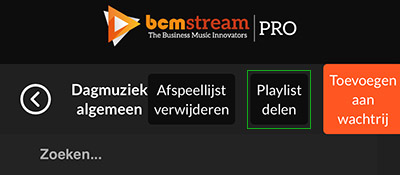
- Click " Share Playlist"
- A unique share code is generated automatically
- Easily share this code via email, WhatsApp, or another messaging app, for example
- A QR code is also displayed so that the recipient can add the playlist with a single scan
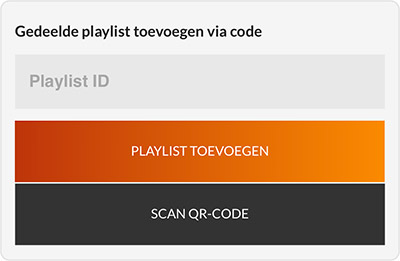
To add a playlist using the QR code, go to your playlists and click the “+”button. In the pop-up window, click the“Scan QR Code”button.
How does it work?
- Create your own playlist
- Click " Share Playlist"
- A unique share code is generated automatically
- Easily share this code via email, WhatsApp, or another messaging app, for example
- A QR code is also displayed so that the recipient can add the playlist with a single scan
To add a playlist using the QR code, go to your playlists and click the “+”button. In the pop-up window, click the“Scan QR Code”button.
One playlist, unlimited sharing
You can share the same playlist with an unlimited number of users. This means you only need to create and manage the playlist once. All users automatically have access to the same, most recent version.
Real-World Examples
Fitness Instructor
Are you a fitness instructor who wants to share the same workout playlist with multiple colleagues? Share the playlist just once. All your colleagues will use the same playlist and automatically receive any changes you make.
Therapist
Are you a therapist putting together an exercise program for a patient? Share the playlist once and link it to the patient’s account. After that, you can update the playlist at any time. The patient will automatically always have the most recent version, without you having to share the playlist again.